●Templates
● Get Apache OpenOffice
● Extensions Wiki
・English
●Français
●Deutsch
●Dictionaries
●Highest Rated
●Most Popular
●Most Recent
●Templates
● Get Apache OpenOffice
● Extensions Wiki
・English
●Français
●Deutsch
●Dictionaries
●Highest Rated
●Most Popular
●Most Recent
Provider:
|
 Luc Sorel Luc Sorel |
Maintainer:
|
lucsorel |
Rating:
|
(4 votes)
|
Application:
|
Calc |
Tags:
|
calc, extension, dokuwiki, extension, export, extension, gui, extension, table, extension, format, extension |
Screenshots:
|
http://www.lucsorel.com/media/downloads/calc2dokuwiki_screenshot.png |
Post date:
|
Sunday, 23 September, 2007 - 09:30 |
Statistics
|
Week: Not tracked - Month: Not tracked - Year: Not tracked - Timeline |
 Download extension
System Independent version - All releases
Compatible with OpenOffice 4: Unknown
User feedback:
Compatible with OpenOffice 4.x?
●
up
50%
●
down
50%
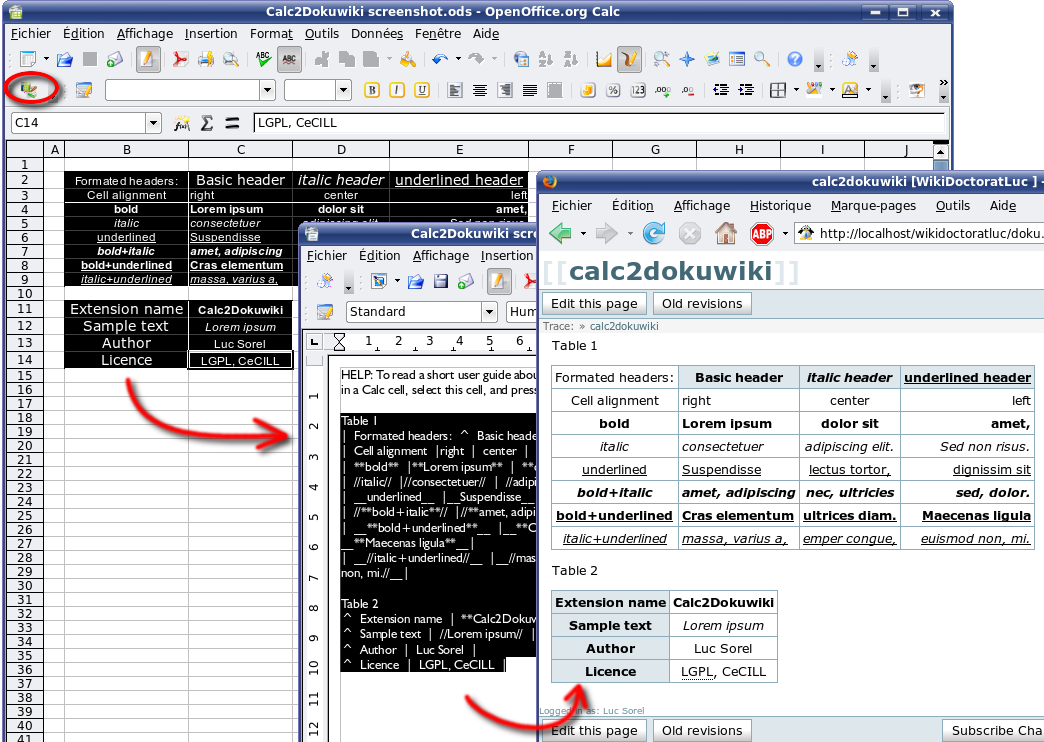
Export selected ranges of cells to formated tables in Dokuwiki syntax. Download page with tutorial and screenshot.
Download extension
System Independent version - All releases
Compatible with OpenOffice 4: Unknown
User feedback:
Compatible with OpenOffice 4.x?
●
up
50%
●
down
50%
Export selected ranges of cells to formated tables in Dokuwiki syntax. Download page with tutorial and screenshot.

 Apache and the Apache feather logos are trademarks of The Apache Software Foundation. OpenOffice.org and the seagull logo are registered trademarks of The Apache Software Foundation. Other names appearing on the site may be trademarks of their respective owners.
Contact us
Apache and the Apache feather logos are trademarks of The Apache Software Foundation. OpenOffice.org and the seagull logo are registered trademarks of The Apache Software Foundation. Other names appearing on the site may be trademarks of their respective owners.
Contact us