
 ●About
●Campaigns
●Licensing
●Membership
●Resources
●Community
●♥Donate♥
●Shop
●Search
●About
●Campaigns
●Licensing
●Membership
●Resources
●Community
●♥Donate♥
●Shop
●Search
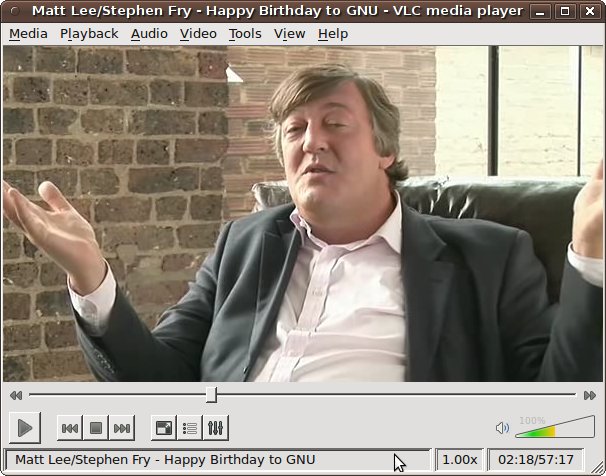 Here is VLC in action, playing 'Happy Birthday to GNU' featuring Stephen Fry.
With thanks to Xiph.org
 The Xiph.Org Foundation is a non-profit corporation dedicated to protecting the foundations of Internet multimedia from control by private interests.
Help the FSF stay strong
The Xiph.Org Foundation is a non-profit corporation dedicated to protecting the foundations of Internet multimedia from control by private interests.
Help the FSF stay strong
 Ring in the new year by supporting software freedom and helping us reach our goal of 100 new associate members!
Free software campaigns
●Freedom Ladder
●Fight to Repair
●Free JavaScript
●High Priority Free Software Projects
●Secure Boot vs Restricted Boot
●Surveillance
●Upgrade from Windows
●Working Together for Free Software
●Defective by Design
●End Software Patents
●OpenDocument
●Free BIOS
●Past campaigns
Ring in the new year by supporting software freedom and helping us reach our goal of 100 new associate members!
Free software campaigns
●Freedom Ladder
●Fight to Repair
●Free JavaScript
●High Priority Free Software Projects
●Secure Boot vs Restricted Boot
●Surveillance
●Upgrade from Windows
●Working Together for Free Software
●Defective by Design
●End Software Patents
●OpenDocument
●Free BIOS
●Past campaigns
 News
News
 Eko K. A. Owen joins the FSF board as the union staff pick
Dec 29, 2025
Free Software Foundation receives historic private donations
Dec 24, 2025
Free Software Awards winners announced: Andy Wingo, Alx Sa, Govdirectory
Dec 09, 2025
More news…
Recent blogs
GPL-compliant reasonable legal notices and author attributions
You came through for free software!
Our members help secure the future of a free society
Turning freedom values into freedom practice with the FSF tech team
Recent blogs -
More…
Upcoming Events
Meet up with FSF staff and Librephone developer at FOSDEM 2026
Jan 31, 2026 - Feb 01, 2026
—
ULB Solbosch Campus, Brussels, Belgium, Europe
Free Software Directory meeting on IRC: Friday, February 6, starting at 12:00 EST (17:00 UTC)
Feb 06, 2026 12:00 PM - 03:00 PM
—
#fsf on libera.chat
Previous events…
Upcoming events…
The FSF is a charity with a worldwide mission to advance software freedom — learn about our history and work.
Copyright © 2004-2026 Free
Software Foundation, Inc. Privacy Policy.
This work is licensed under a Creative
Commons Attribution-No Derivative Works 3.0 license (or later
version) — Why this license?
Skip sitemaporskip to licensing items
●About
●Staff and Board
●Contact Us
●Press Information
●Jobs
●Volunteering and Internships
●History
●Privacy Policy
●JavaScript Licenses
●Hardware Database
●Free Software Directory
●Free Software Resources
●Copyright Infringement Notification
Skip to general items
●Campaigns
●Freedom Ladder
●Fight to Repair
●Free JavaScript
●High Priority Free Software Projects
●Secure Boot vs Restricted Boot
●Surveillance
●Upgrade from Windows
●Working Together for Free Software
●GNU Operating System
●Defective by Design
●End Software Patents
●OpenDocument
●Free BIOS
●Connect with free software users
Skip to philosophical items
●Licensing
●Education
●Licenses
●GNU GPL
●GNU AGPL
●GNU LGPL
●GNU FDL
●Licensing FAQ
●Compliance
●How to use GNU licenses
for your own software
●Latest News
●Upcoming Events
●FSF Blogs
Skip list
●Donate to the FSF
●Join the FSF
●Patrons
●Associate Members
●My Account
●Working Together for Free Software Fund
●Philosophy
●The Free Software Definition
●Copyleft: Pragmatic Idealism
●Free Software and Free Manuals
●Selling Free Software
●Motives for Writing Free Software
●The Right To Read
●Why Open Source Misses the Point of Free Software
●Complete Sitemap
Eko K. A. Owen joins the FSF board as the union staff pick
Dec 29, 2025
Free Software Foundation receives historic private donations
Dec 24, 2025
Free Software Awards winners announced: Andy Wingo, Alx Sa, Govdirectory
Dec 09, 2025
More news…
Recent blogs
GPL-compliant reasonable legal notices and author attributions
You came through for free software!
Our members help secure the future of a free society
Turning freedom values into freedom practice with the FSF tech team
Recent blogs -
More…
Upcoming Events
Meet up with FSF staff and Librephone developer at FOSDEM 2026
Jan 31, 2026 - Feb 01, 2026
—
ULB Solbosch Campus, Brussels, Belgium, Europe
Free Software Directory meeting on IRC: Friday, February 6, starting at 12:00 EST (17:00 UTC)
Feb 06, 2026 12:00 PM - 03:00 PM
—
#fsf on libera.chat
Previous events…
Upcoming events…
The FSF is a charity with a worldwide mission to advance software freedom — learn about our history and work.
Copyright © 2004-2026 Free
Software Foundation, Inc. Privacy Policy.
This work is licensed under a Creative
Commons Attribution-No Derivative Works 3.0 license (or later
version) — Why this license?
Skip sitemaporskip to licensing items
●About
●Staff and Board
●Contact Us
●Press Information
●Jobs
●Volunteering and Internships
●History
●Privacy Policy
●JavaScript Licenses
●Hardware Database
●Free Software Directory
●Free Software Resources
●Copyright Infringement Notification
Skip to general items
●Campaigns
●Freedom Ladder
●Fight to Repair
●Free JavaScript
●High Priority Free Software Projects
●Secure Boot vs Restricted Boot
●Surveillance
●Upgrade from Windows
●Working Together for Free Software
●GNU Operating System
●Defective by Design
●End Software Patents
●OpenDocument
●Free BIOS
●Connect with free software users
Skip to philosophical items
●Licensing
●Education
●Licenses
●GNU GPL
●GNU AGPL
●GNU LGPL
●GNU FDL
●Licensing FAQ
●Compliance
●How to use GNU licenses
for your own software
●Latest News
●Upcoming Events
●FSF Blogs
Skip list
●Donate to the FSF
●Join the FSF
●Patrons
●Associate Members
●My Account
●Working Together for Free Software Fund
●Philosophy
●The Free Software Definition
●Copyleft: Pragmatic Idealism
●Free Software and Free Manuals
●Selling Free Software
●Motives for Writing Free Software
●The Right To Read
●Why Open Source Misses the Point of Free Software
●Complete Sitemap
Send your feedback on our translations and new translations of pages to campaigns@fsf.org.