@zoltandulac
 @zoltandulac
 @zoltandulac
 Zoltan Hawryluk
Javascript on to email me.
Categories
●3d
●accessibility
●modal role
●Color
●Cygwin
●Internationalization
●Localization
●math
●server side tech
●Technologies
●ClearType
●CSS
●CSS3
●animation
●border-image
●box-shadow
●cursor
●flex-layout
●gradients
●hsl/hsla
●matrix
●matrix3d
●order
●psuedo-classes
●rgb/rgba
●standard proposal
●text-shadow
●transform
●transform3d
●transition
●viewport units
●IE Visual Filters
●Fonts
●@font-face
●converting
●FontForge
●HTML
●Forms
●HTML5
●canvas
●Custom Data Attributes
●dialog
●Drag and Drop
●Events
●forms
●progress
●pushState
●Ruby
●Images
●JavaScript
●animation
●Events
●jQuery
●Polyfills
●requestAnimationFrame
●XML
●SVG
●VML
●transform3d
●Uncategorized
●utf8
●video
Skip to Main Navigation
« Cross Browser HTML5 Drag and Drop
Cross-Browser Animated CSS Transforms — Even in IE. »
Zoltan Hawryluk
Javascript on to email me.
Categories
●3d
●accessibility
●modal role
●Color
●Cygwin
●Internationalization
●Localization
●math
●server side tech
●Technologies
●ClearType
●CSS
●CSS3
●animation
●border-image
●box-shadow
●cursor
●flex-layout
●gradients
●hsl/hsla
●matrix
●matrix3d
●order
●psuedo-classes
●rgb/rgba
●standard proposal
●text-shadow
●transform
●transform3d
●transition
●viewport units
●IE Visual Filters
●Fonts
●@font-face
●converting
●FontForge
●HTML
●Forms
●HTML5
●canvas
●Custom Data Attributes
●dialog
●Drag and Drop
●Events
●forms
●progress
●pushState
●Ruby
●Images
●JavaScript
●animation
●Events
●jQuery
●Polyfills
●requestAnimationFrame
●XML
●SVG
●VML
●transform3d
●Uncategorized
●utf8
●video
Skip to Main Navigation
« Cross Browser HTML5 Drag and Drop
Cross-Browser Animated CSS Transforms — Even in IE. »
skew() transform no longer works in Firefox, due to not being in the CSS3 specification anymore. Developers must use the skewX() and skewY() functions instead. The examples in cssSandaper, as well as this documentation, have been updated to reflect this change in the spec. Thanks to Pablo, who gave a bug report on the cube example below that led me to find out about this.
●(June 29th, 2011): cssSandpaper has been updated to support CSS3 text-shadows in IE.
●(August 28th, 2010) cssSandpaper now supports HSL/HSLA colors.
●(May 6th, 2010): cssSandpaper has been updated to support RGBA gradients.
●(April 6, 2010): Please see the follow up article on Cross Browser CSS3 Animation which explores scripting CSS3 properties.
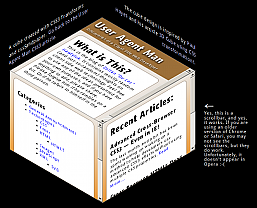 An example of a page using the CSS Transform property and cssSandpaper. Visible in most major browsers, including Internet Explorer. Layout based on work done by Paul Hayes in his article
The CSS
An example of a page using the CSS Transform property and cssSandpaper. Visible in most major browsers, including Internet Explorer. Layout based on work done by Paul Hayes in his article
The CSS transform property allows developers to rotate, scale, and skew blocks of HTML via CSS. Although you can do the same thing with images in Photoshop or The GIMP, using CSS transforms allows developers to do the same thing with any HTML markup and allows users to select the text within the transformed object.
When I first saw sites using transform, I looked at the underlying code and tried to produce pages using transform in all browsers. Although Firefox, Opera and Webkit based browser support it via vendor-specific prefixes (using -moz-transform, -o-transform and -webkit-transform respectively) Internet Explorer doesn’t support it at all. I didn’t like that, so I took out my JavaScript whip, beat Explorer into submission and made it do my bidding (but not without getting a few mental bruises of my own).
Before I start talking about the details of my solution, let’s take a look at a few examples of it in action. The following code has been tested with Firefox 3.5, Safari 4, Chrome 4, Internet Explorer 6 and higher.
(一)Rotations Example
(二)Skew Example
(三)Cube Example, using rotates and skews
(四)Another example that looks like a CSS3 version of a Geocities page.
(The examples also work on my copy of Opera 10.5, although I have seen it fail on other installations – I will update this post when I find out why).
transform with an IE technology that does something similar: the DXImageTransform.Microsoft.Matrix CSS filter.
I then, to steal a phrase from Russel Peters, started to Hurt Real Bad:
●the syntax of transform is very obvious:
#myObject {
   transform: rotate(40deg) scale(2.0);
}
but the IE filter code is quite intimidating:
#myObject {
   filter: progid:DXImageTransform.Microsoft.Matrix(sizingMethod='auto expand',
        M11=1.5320888862379554, M12=-1.2855752193730787,
        M21=1.2855752193730796, M22=1.5320888862379558);
}
The scary numbers that the DXImageTransform.Microsoft.Matrix filter uses requires knowledge of matrix and vector mathematics. Even though there is a great Wikipedia article on the subject, even the mathematically gifted wouldn’t want to do the calculations to do a simple rotate in CSS (I would like to note here that even though I have a university degree in Mathematics, I hate doing arithmetic inside my head. If you don’t believe me, watch me figure out a tip at a restaurant sometime. I’m not kidding).
●although it is possible to have a list of transformations using transform, the DXImageTransform.Microsoft.Matrix filter only allows one transform matrix. In order to implement multiple transforms using one filter, a designer would have to convert all the transforms into matrices and multiply them together. Again, as ugly as I am when I first wake up in the morning.
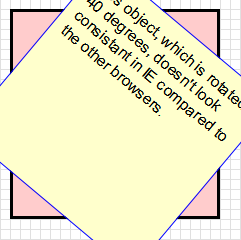
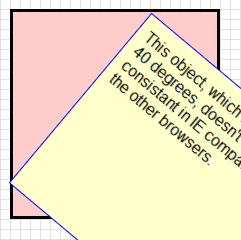
●when rotating, skewing, or doing any other transformations on objects using the transform property, the center of the object remains fixed. However, the Matrix filter doesn’t keep the centre of the transformed object fixed, as seen by the illustration below:
See the above example in action (compare IE with the other browsers to see the difference for yourself)
I was about to give up on my endeavor until I read Weston Ruter’s clever CSS Gradients in Canvas article, which implements gradients in older versions Firefox and Opera. What I really liked was how he used the CSS from a web page to place the canvas gradients in the page (as opposed to using CSS classes to indicate where the gradients should go). I then thought it would be a great idea to do the same with CSS transforms – why not have JavaScript find out which objects are transformed by reading the style sheets containing the transform rules, and if the browser is Internet Explorer, apply the Matrix filter, while translating the image so that the center is maintained. How hard could it be …….. right?
After a few obsessive months of coding, coffee drinking and Asprin popping (as well angrily asking myself on several occasions why the &@$! I would wanted to do this in the first place), I created cssSandpaper.js, a library that implements transform (and some other CSS3 properties) as consistently as possible in all browsers. It uses many ideas from Ruter’s gradient script, as well as sylvester.js, James Coglan’s brilliant matrix and vector math library.
The code is currently in a beta stage, but I think that it’s in good enough shape that developers can start to play around with these really cool effects today and have it work in almost any browser.
| Explorer 6.x+ | Firefox 3.5+ | Safari 4.0+ | Chrome 3.0+ | Opera 10.0+ | |
|---|---|---|---|---|---|
| Windows |  |
 |
 |
 |
 |
| Mac OS X | Not Applicable |  |
 |
 |
Doesn’t support transforms yet (as of version 10.50) |
| Linux | Not Applicable |  |
Not Applicable | 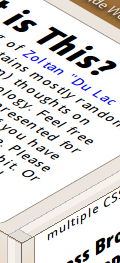 |
Doesn’t support transforms yet (as of version 10.50) |
<script type="text/javascript" src="path/to/js/cssQuery-p.js"></script> <script type="text/javascript" src="path/to/js/jcoglan.com/sylvester.js"></script> <script type="text/javascript" src="path/to/js/cssSandpaper.js"></script>You can then use the transform property in your web pages. Note that since the specification for the transform property is finalized by the W3C, I decided to use the vendor-specific prefix
-sand- before each CSS3 property it supports.
The following is a description of how to use transform, as well as two other CSS3 properties that cssSandpaper supports, box-shadow and gradient.
Go to the cssSandpaper documentation to download the latest version.
#container {
   -sand-transform:  <function-list>;
}
where <function-list> can be a space separated list of the following functions:
| Function | Purpose |
|---|---|
rotate(angle) |
Rotates HTML elements. angle can be in degrees (e.g. rotate(30deg)) or radians rotate(1.3rad) |
scale(sx[, sy]) |
Scales HTML elements. sx and sy are numbers, where 1 represents the original size, 2 represents twice the size, etc. Note that if sy isn’t specified, it is assumed to be equal to sx. Similar functions are scaleX(sx) and scaleY(sy). |
skewX(ax), and skewY(ay) |
These functions skew the object around the x and y axes by the specified angles in degrees or radians.Note: the skew(ax, ay) function, which used to work in browsers that support CSS3 Transforms natively is no longer part of the W3C CSS3 spec and is no longer supported by Firefox. |
matrix(a, c, b, d, tx, ty) |
Applies a 2D transformation matrix comprised of the specified six values. If you aren’t familiar with linear algebra and matrix arithmetic, this function will be hard to understand. For further information, you may want to read Wikipedia’s Transformation Matrix article, although if you are mathematically challenged, you may run away from your computer screaming. If you are familiar with matrix multiplication, note that c and b are reversed. This follows the way Firefox has implemented this method (ibelieve WebKit based browsers reverse these numbers). |